

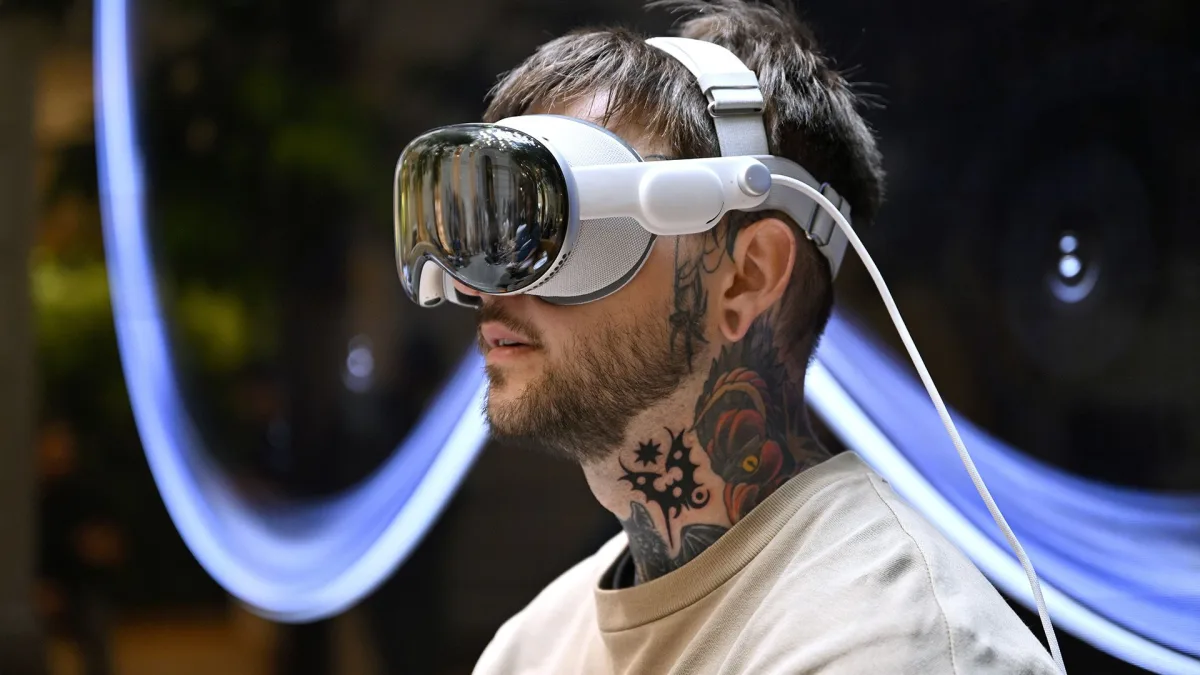
When Apple first introduced the Vision Pro, the tech world was divided. Some called it revolutionary. Others dismissed it as an expensive experiment. Fast forward to 2026, and the updated Apple Vision Pro is no longer just a futuristic concept — it’s becoming a serious productivity and entertainment device.
In this detailed review, we’ll break down everything: design, performance, real-world usability, mixed reality features, comfort, battery life, and whether it’s truly worth your investment in 2026.
Design & Build Quality: Premium, As Expected From Apple
The 2026 edition of Apple Vision Pro keeps the same premium DNA but refines comfort and weight balance.
-
Aerospace-grade aluminum frame
-
Curved laminated glass front
-
Adjustable headband system
-
Improved airflow ventilation
Apple has slightly reduced the weight compared to the first release, which makes longer sessions more manageable. It still feels premium — not like a toy, not like a VR gadget — but like a serious computing device.
The external EyeSight display (the feature that shows your eyes to people outside) has also been improved for better clarity and realism.
Display Quality: Possibly the Best Visual Experience in Any Headset
This is where Apple dominates.
The Vision Pro uses dual micro-OLED displays with incredibly high pixel density. The clarity is so sharp that individual pixels are almost impossible to detect.
Key Highlights:
-
Ultra-high resolution per eye
-
True-to-life colors
-
Deep contrast levels
-
Smooth refresh rate
-
HDR support
Watching 4K content inside Vision Pro feels like sitting in a private IMAX theater. Blacks are deep, colors are vibrant, and brightness levels are impressive even in mixed lighting conditions.
If display quality is your priority — this is arguably the best mixed reality headset in 2026.
Performance & Chipset: Desktop-Class Power on Your Face
Apple has upgraded the internal chip to a newer generation processor (based on M-series architecture).
This means:
-
Faster app loading
-
Smoother multitasking
-
Better spatial rendering
-
Improved AI processing
You can open multiple floating screens — Safari, Notes, Messages, YouTube — and place them around your physical room. Everything feels fluid and responsive.
There is no noticeable lag during heavy multitasking.
Spatial Computing: Is It Actually Useful?
This is the biggest question.
Apple doesn’t call it VR. They call it Spatial Computing.
Instead of being immersed in a completely virtual world, Vision Pro blends digital content with your real environment.
You can:
-
Resize apps like physical screens
-
Pin virtual monitors to your wall
-
Watch movies while seeing your surroundings
-
Work with 3–5 virtual desktops at once
For productivity users, this is where the Vision Pro starts making sense.
Video editors, stock traders, developers, and designers can benefit from unlimited screen space without buying multiple monitors.
Eye Tracking & Gesture Control: Surprisingly Accurate
Apple removed traditional controllers. Instead, you use:
-
Eye tracking
-
Finger gestures
-
Voice commands
You simply look at an element and pinch your fingers to select.
It sounds gimmicky — but in real use, it’s incredibly precise.
After a few hours, it feels natural.
This hands-free control system is one of the strongest selling points of Vision Pro.
Entertainment Experience: A Personal Cinema
If you’re into movies or streaming — this device shines.
-
Netflix
-
Apple TV+
-
Disney+
-
YouTube
-
Spatial video playback
You can turn your living room into a giant 100-inch cinema screen instantly.
Spatial audio makes the experience immersive without needing external speakers.
For content consumption, Vision Pro is unmatched in the MR category.
Gaming & Apps Ecosystem
The app ecosystem is growing steadily.
Many iPad apps are now optimized for Vision Pro. Developers are also building spatial-native apps.
However:
-
It’s not a hardcore gaming headset like Meta Quest
-
AAA VR gaming support is still limited
This device is more productivity + entertainment focused rather than gaming-first.
Battery Life & Practical Usage
Battery life remains one of the limitations.
-
Around 2–2.5 hours on external battery pack
-
Longer if plugged in
For long work sessions, you’ll likely keep it connected to power.
This isn’t a casual “wear all day” device yet.
Comfort: Better But Still Not Perfect
The 2026 edition improves:
-
Weight distribution
-
Face padding
-
Strap adjustment
However, wearing it for 3–4 hours continuously can still feel heavy.
It’s improved — but not lightweight glasses-level comfortable yet.
Real-World Use Cases
Who is this actually for?
✔ Content creators
✔ Remote workers
✔ Tech enthusiasts
✔ Early adopters
✔ Digital designers
Who should avoid it?
✖ Budget buyers
✖ Casual users
✖ People expecting VR gaming machine
Price & Value
It’s still premium-priced.
This is not a mass-market device yet.
You’re paying for:
-
Innovation
-
Display quality
-
Apple ecosystem integration
-
Early access to spatial computing
If you’re deeply invested in Apple’s ecosystem, it makes more sense.
Final Verdict: Is Apple Vision Pro Worth It in 2026?
The Apple Vision Pro (2026 Edition) is not just a headset — it’s Apple’s vision for the future of computing.
It’s powerful.
It’s beautifully engineered.
It delivers unmatched display quality.
But it’s also expensive and still evolving.
If you want to experience the next generation of digital interaction — this is the device to buy.
If you want something practical and affordable — you may want to wait.



